QOwnNotesQOwnNotes
시작하기
설치
  • Ask question
  • Ask for feature
  • Report bug
  • Telegram Channel
  • Matrix/Element.io Room
  • Gitter Chat
  • IRC Channel
  • Mastodon
  • Twitter
  • Facebook
후원
  • English
  • Deutsch
  • Italiano
  • Français
  • Español
  • فارسی
  • Nederlands
  • Magyar
  • العربية
  • Polski
  • 한국어
GitHub
시작하기
설치
  • Ask question
  • Ask for feature
  • Report bug
  • Telegram Channel
  • Matrix/Element.io Room
  • Gitter Chat
  • IRC Channel
  • Mastodon
  • Twitter
  • Facebook
후원
  • English
  • Deutsch
  • Italiano
  • Français
  • Español
  • فارسی
  • Nederlands
  • Magyar
  • العربية
  • Polski
  • 한국어
GitHub
  • 시작하기

    • 개요
    • 개념
    • QOwnNotes 데모
    • Markdown Cheatsheet
    • 노트 가져오기
    • 명령줄 인터페이스 매개 변수
    • QOnNotes 웹 지원 브라우저 확장
    • 홈페이지 제안 API
    • 명령줄 스니펫 관리자
    • QOwnNotes 웹 앱
    • QOwnNotesAPI Nextcloud 앱
    • 노트 관계 패널
    • 노트 검색
    • 단축키
    • Git 버전 관리
  • 설치

    • 설치
    • Ubuntu Linux, elementary OS 및 Linux Mint에 설치
    • Microsoft Windows™에 설치
    • macOS™에 설치
    • Debian Linux에 설치
    • OpenSUSE Linux에 설치
    • Fedora Linux에 설치
    • 스냅으로 설치
    • Flatpak으로 설치
    • AppImage로 설치
    • Nix를 통해 설치
    • Arch Linux에 설치
    • Solus에 설치
    • KaOS Linux에 설치
    • CentOS Linux에 설치
    • Raspberry Pi OS에 설치
    • Gentoo Linux에 설치
    • Funtoo Linux에 설치
    • Void Linux에 설치
    • Slackware Linux에 설치
    • FreeBSD에 설치
    • QOwnNotes 빌드
  • 편집기

    • 맞춤법 검사
    • 언어 도구
    • Harper
    • AI support
    • 시간 형식
  • 스크립팅

    • QOwnNotes 스크립팅
    • QOwnNotes에서 제공하는 메서드 및 개체
    • Hooks
    • 해설 클래스
  • 기여하기

    • 참여하기
    • Code contributions
    • 행동 강령
    • 유지 관리자
    • 번역
    • 기부
    • 후원
  • 자주 묻는 질문

    • 노트 편집 패널 없이 미리 보기 패널만 표시하려면 어떻게 해야 합니까?
    • QOwnNotes에 대해 다른 사용자가 말한 내용은 어디에서 찾을 수 있습니까?
    • 왜 메트릭스인가요?
  • 블로그 (영어)

    • Overview
    • Layouts and layout presets
    • QOwnNotes Webpage Relaunch with VuePress 2, Vue.js 3, and Vuetify 3
    • Universal binary for macOS
    • Note relations panel
    • AI support was added to QOwnNotes
    • Source Archive switched from TuxFamily to GitHub Releases
    • Nextcloud Deck integration in QOwnNotes
    • QOwnNotes UI End2End Tests with the help of NixOS
    • Please test Qt6 version of QOwnNotes from a new PPA for Ubuntu Linux
    • Evernote import for huge files
    • Happy 1000th release of QOwnNotes
    • Polish website translation
    • Working with multiple notes
    • QOwnNotes command-line snippet manager
    • Nextcloud note versions
    • Manage orphaned image files and attachments
    • Linking of note headings
    • Tor Hidden Service Webpage
    • Use workspaces to manage different layouts of the user interface
    • Auto-complete text in note editor
    • Open links in the note editor
    • Solve simple equations in the note editor
    • Auto-format Markdown tables
    • QOwnNotes Mastodon page
    • Repository for Debian 11
    • Joplin import
    • Send photos from your mobile phone to QOwnNotes on the desktop
    • Four new languages added to the website
    • QOwnNotes Demo
    • Markdown explanation
    • Webpage translation
    • QOwnNotes for Ubuntu 21.04 Hirsute Hippo
    • QOwnNotes for Fedora 33
    • Release and blog posting automation
    • Legacy update service up again
    • RSS Feeds are back in place
    • Time Flies Podcast episode with interview about QOwnNotes
    • Bookmark management with QOwnNotes and Web Companion browser extension
    • Firefox extension on Firefox Add-ons page
    • Chrome extension in Chrome Web Store
    • QOwnNotes Web Companion Chrome extension
    • 500th release of QOwnNotes
    • QOwnNotes Telegram Group
    • Vim mode
    • QOwnNotes for openSUSE Leap 15, SUSE Linux Enterprise 15 and SUSE Linux Enterprise 12 SP3
    • QOwnNotes featured on LINUX Unplugged podcast and by Ubuntu
    • Interview for ownCloud
    • QOwnNotes for Fedora 27
    • QOwnNotes reviewed in German magazine c't
    • QOwnNotesAPI in the ownCloud Marketplace
    • QOwnNotes as AppImage
    • QOwnNotes for Debian 9.0, Fedora 26 and openSUSE Leap 42.3
    • Script repository and script settings variables
    • Fedora 25 release and new documentation page
    • Solus package for QOwnNotes
    • Automatic updates in Windows and macOS
    • Note encryption with keybase.io or directly with PGP
    • Evernote import
    • Portable mode
    • QOwnNotes on webupd8.org
    • QOwnNotes featured on the Linux Voice Podcast
    • QOwnNotes snap
    • QOwnNotes review in British magazine Linux Format
    • QOwnNotes Slackware Linux Repository
    • QOwnNotes review
    • QOwnNotes IRC
    • QOwnNotes now has scripting support
    • QOwnNotes is the Desktop App Pick on the Linux Action Show
    • QOwnNotes got featured in Linux Voice 25
    • QOwnNotes Gentoo Linux Overlay
    • Translate QOwnNotes on Crowdin
    • QOwnNotes 1.0 out now in 6 languages and with Freedesktop theme icons support
    • QOwnNotes software repository for Debian Linux
    • QOwnNotes package on the Arch User Repository
    • QOwnNotes software repository for Arch Linux
    • Webpage redesign
    • Qt widget QMarkdownTextEdit now a separate project for developer's pleasure
    • New release version RSS feed
    • New Linux software repositories and todo list support
    • QOwnNotes on Linux Unplugged
    • Build and release systems for QOwnNotes for Linux, macOS and Windows!
    • Links to other notes or files are now possible in QOwnNotes
  • 변경 로그 (영어)

    • QOwnNotes Changelog

Harper

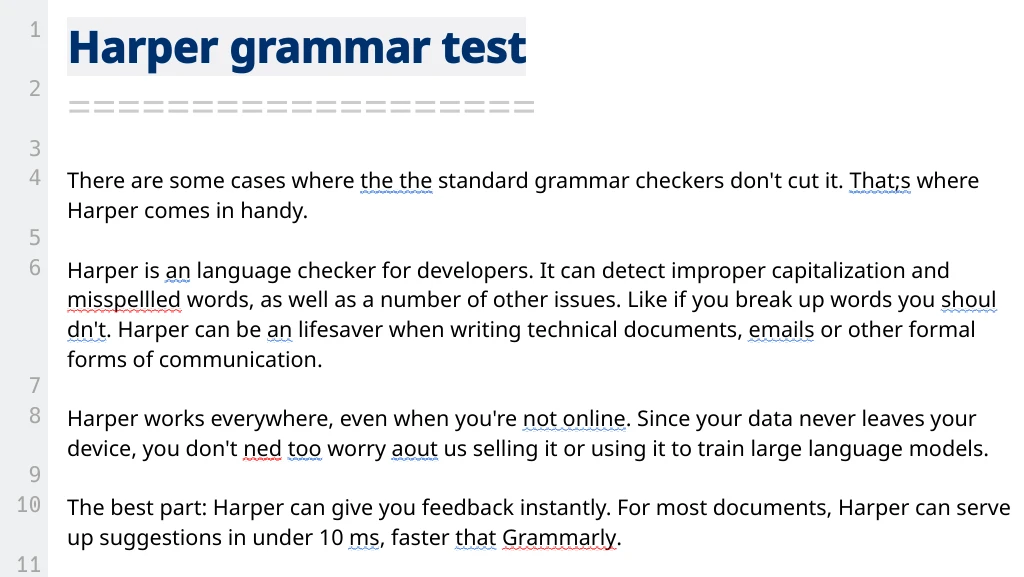
QOwnNotes can use Harper for optional offline grammar and style checking in the note editor.

It complements the existing spellchecking support instead of replacing it.

harper-demo

Features

  • Colored underlines for detected grammar, style, punctuation, and wording issues
  • Context-menu suggestions for replacements
  • Ignore this rule and Ignore word actions in the context menu
  • A quick toggle in the Edit menu with Check grammar with Harper
  • Local checking with the harper-ls language server over Stdio or TCP

Setup

Open Settings and select Editor -> Harper.

  • Turn on Enable offline grammar and style checking with Harper
  • Choose the Transport
    • Stdio (recommended) starts a local harper-ls process directly
    • TCP connects to an already running harper-ls server
  • For Stdio, set the Command / binary path
    • The default command is harper-ls
    • Auto-detect searches for it in your PATH
  • For TCP, set the Server address and Port
    • The defaults are 127.0.0.1 and 4000
  • Choose the Dialect
    • American
    • British
    • Australian
    • Canadian
    • Indian
  • Adjust the Check delay to control how long QOwnNotes waits after typing before sending a request
  • Select which linters should be enabled
    • Spell Check
    • Sentence Capitalization
    • Repeated Words
    • Long Sentences
    • An vs A
    • Unclosed Quotes
    • Correct Number Suffix
    • Spaces
    • 인용 간격
    • 프랑스어 공백 없음
    • 잘못된 아포스트로피
    • Spelled Numbers

Use Test Connection to verify that QOwnNotes can either start harper-ls in Stdio mode or reach the configured server in TCP mode.

How It Works

  • QOwnNotes checks visible editor blocks instead of the whole document at once
  • Empty lines, headings, and code blocks are skipped
  • Requests are debounced so Harper is not queried on every keystroke
  • Results are shown inline in the Markdown editor
  • Harper and LanguageTool can be enabled at the same time

Notes

  • Harper support is optional and depends on the feature being enabled in your build
  • Stdio mode is the simplest setup for local offline checking
  • If Harper cannot be reached, QOwnNotes shows a warning and stops checking until it is available again

Related

  • Spellchecking
  • LanguageTool
  • Concept
Prev
언어 도구
Next
AI support