
QOwnNotes TUI
QOwnNotes TUI is a keyboard-first terminal browser and editor for local, QOwnNotes-compatible Markdown note folders. It can directly use the note folders configured in QOwnNotes, so you can start working with your existing notes right away.
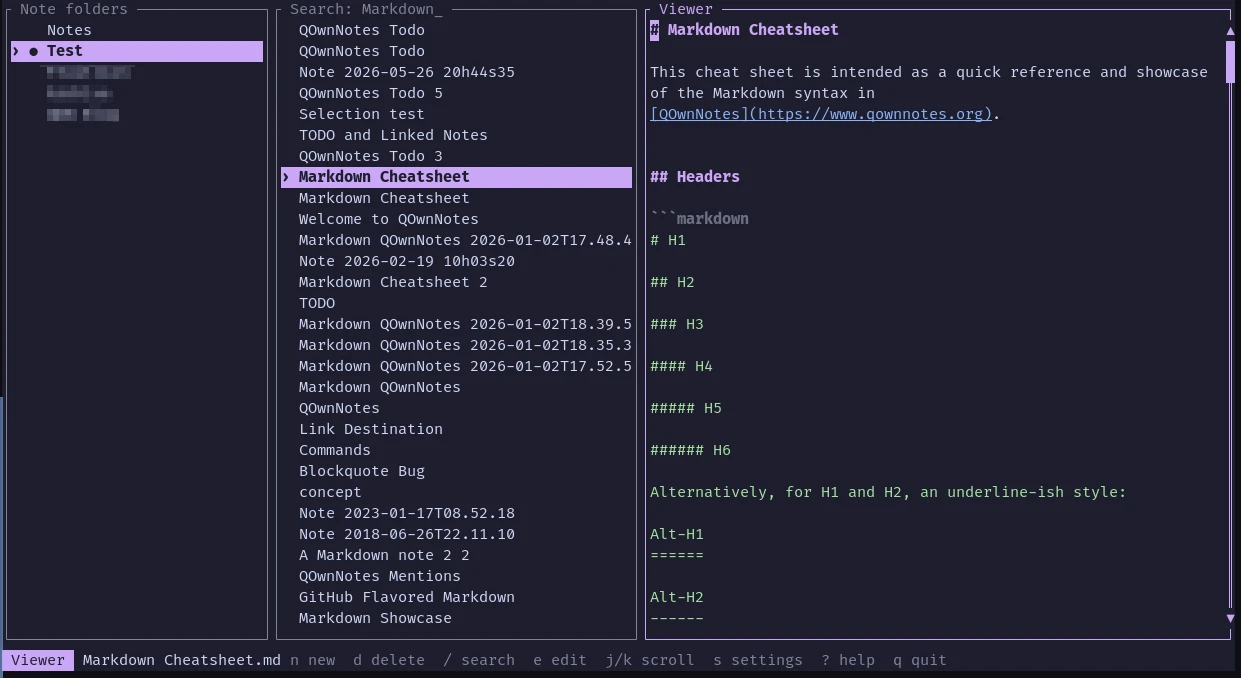
- It uses the note folders configured in QOwnNotes and follows its note sorting settings (the QOwnNotes application database is opened read-only)
- Notes can be created, edited, searched, syntax-highlighted, renamed from their content, and safely deleted from the terminal
- Changes are saved automatically and external-change conflicts are detected
- It supports configurable themes, mouse controls, Nix, and a Home Manager module
- Shell completions can be generated for Bash, Fish, Zsh, and more
Installation
Visit the latest release page and download the version you need.
팁
If you are using Nix, you can build and run the application directly:
nix run github:qownnotes/qownnotes-tui -- --notes-dir ~/Notes
The Nix package installs shell completions for Bash, Fish, and Zsh automatically.
Usage
Open a note folder from the command line:
qownnotes-tui --notes-dir ~/Notes
If no note folder is given, the application reads all configured note folders from QOwnNotes and initially opens the current folder.
Some of the most important keys:
| Key | Action |
|---|---|
j, k | Move selection or scroll the viewer |
h, l, Tab | Switch panes |
Enter | Activate a note folder or open a note |
n, Ctrl-n | Create a timestamped note |
d | Delete a note after confirmation |
e | Edit the selected note |
/ | Search note names and text |
Ctrl-s | Save the note |
Esc | Leave editor or return to note list |
? | Show help |
q, Ctrl-c | Quit |
팁
For more information, visit the QOwnNotes TUI repository on GitHub.