
Soporte de IA
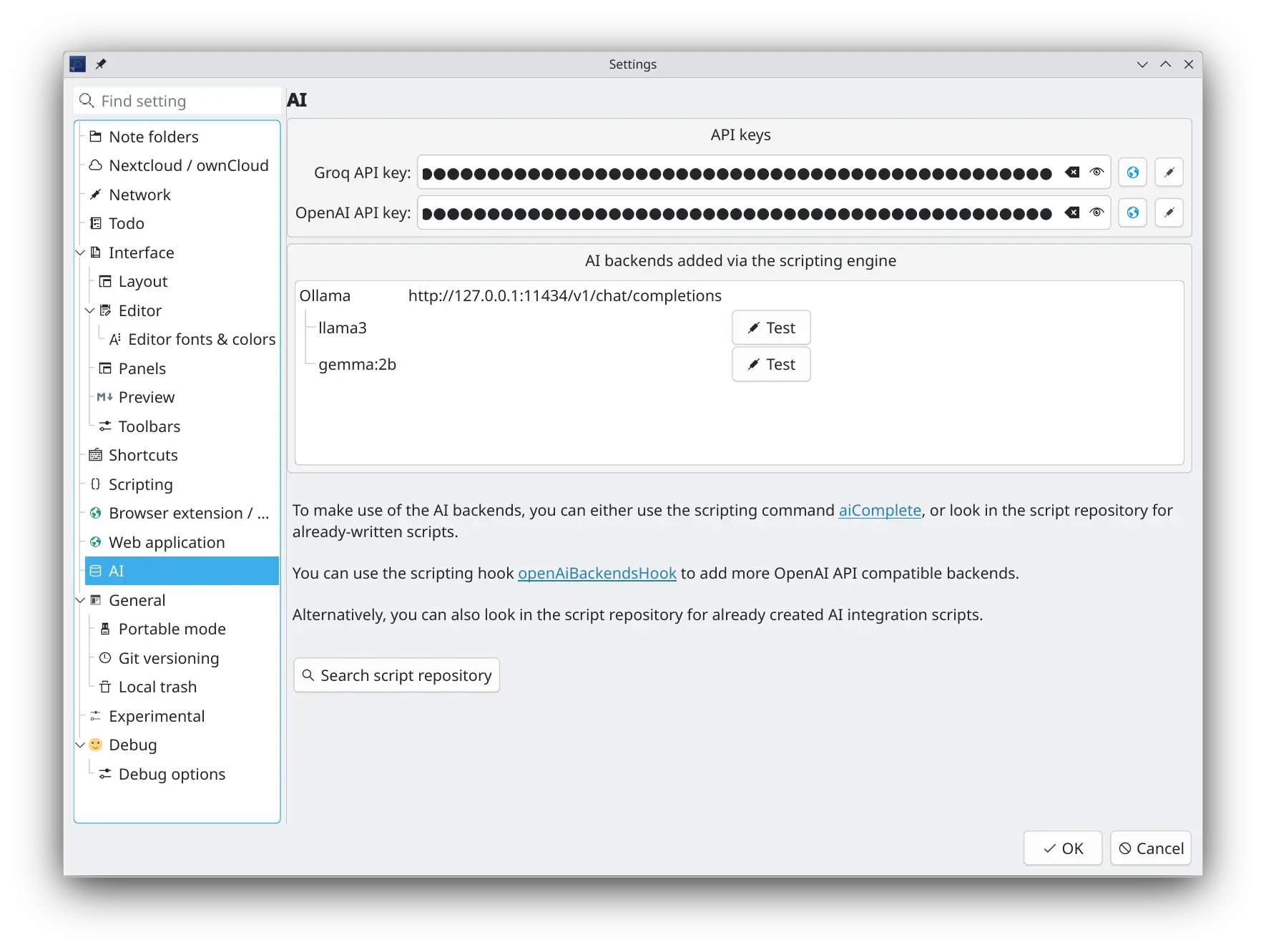
Puede optar por utilizar su modelo de IA favorito (LLM) para ayudarle con sus notas. Hay soporte integrado para Groq (porque puede obtener claves gratuitas de la API) y OpenAI, pero la API interna está diseñada para poder extenderse fácilmente a otros modelos de IA con scripts. Hay varios scripts de integración de backend de IA disponibles en el repositorio de scripts para que pueda comenzar.
Consejos
La API de finalización de OpenAI se implementó para utilizarse en scripts. De esta manera puede hacer lo que quiera y experimentar con ella.
- Hay una barra de herramientas de IA y una sección en el menú principal Editar, en donde puede activar el servicio activado y seleccionar el backend y el modelo de IA
- Puede agregar una clave de la API de OpenAI y Groq en la nueva configuración de IA
- Busque más integraciones de backend de IA, como Ollama y llama.cpp en el repositorio de scripts
- Utilice la nueva orden de secuencias de comandos "script.aiComplete(prompt)" de acuerdo con su propia imaginación
- Para más información, por favor revise la documentación de secuencias de órdenes
- En el repositorio de scripts, como primer paso, hay un script de finalización automática de IA, que utiliza el modelo de IA seleccionado para completar automáticamente la selección actual en la edición del texto de la nota, y un script de herramienta de texto de IA, que utiliza el modelo de IA seleccionado para procesar la selección actual en la edición del texto de la nota, por ejemplo para resumirlo, traducirlo o corregir errores tipográficos y gramaticales
Servidor MCP
QOwnNotes incluye un servidor MCP (Protocolo de Contexto de Modelo) integrado que permite a los agentes de IA externos acceder a sus notas a través de HTTP con transporte de Eventos Enviados por el Servidor (SSE).
Puede habilitar y configurar el servidor MCP en la página de configuración Servidor de IA/MCP.
- Active/desactive el servidor MCP
- Configure el puerto (por defecto: 22226)
- Autenticación con token de portador: se genera automáticamente un token de seguridad que debe incluirse como token de portador en el encabezado de autorización de todas las solicitudes
Herramientas MCP disponibles
El servidor MCP expone las siguientes herramientas a los agentes de IA:
search_notes— Búsqueda de texto completo en todas las notas de la carpeta de notas actual. Acepta un parámetro de cadenaqueryy un límite opcionallimit(por defecto 20). Devuelve los nombres de las notas coincidentes y una breve vista previa de cada una.fetch_note— Recupera el contenido completo de una sola nota pornameoid. Devuelve el texto, nombre de archivo e identificador de la nota.
Conectar un agente de IA
Los agentes de IA se conectan al servidor MCP mediante el protocolo de transporte HTTP+SSE:
- Endpoint SSE:
GET http://localhost:22226/sseAbre un flujo de eventos enviados por el servidor. El servidor envía un eventoendpointque contiene la URL para enviar mensajes JSON-RPC. - Endpoint de mensajes:
POST http://localhost:22226/message?sessionId=<id>
Envíe aquí las solicitudes JSON-RPC de MCP. La respuesta se transmite a través del flujo SSE.
Todas las solicitudes deben incluir el encabezado:
Authorization: Bearer <your-security-token>
Ejemplo de solicitudes curl
Primero, establezca el token y puerto:
export TOKEN="su-token-mcp"
export PORT=22226
Abra el flujo SSE en una terminal:
curl -N \
  -H "Accept: text/event-stream" \
  -H "Authorization: Bearer $TOKEN" \
  "http://localhost:$PORT/sse"
El servidor enviará un evento endpoint que contiene una URL similar a:
event: endpoint
data: http://localhost:22226/message?sessionId=3d8c7b0e-...
Utilice el sessionId de ese evento en las siguientes solicitudes. La solicitud POST devuelve 202 Accepted; la respuesta JSON-RPC se entrega a través del flujo SSE.
Inicializar la sesión MCP:
curl \
  -X POST \
  -H "Content-Type: application/json" \
  -H "Authorization: Bearer $TOKEN" \
  --data '{
    "jsonrpc": "2.0",
    "id": 1,
    "method": "initialize",
    "params": {}
  }' \
  "http://localhost:$PORT/message?sessionId=3d8c7b0e-..."
Listar las herramientas MCP disponibles:
curl \
  -X POST \
  -H "Content-Type: application/json" \
  -H "Authorization: Bearer $TOKEN" \
  --data '{
    "jsonrpc": "2.0",
    "id": 2,
    "method": "tools/list",
    "params": {}
  }' \
  "http://localhost:$PORT/message?sessionId=3d8c7b0e-..."
Buscar notas:
curl \
  -X POST \
  -H "Content-Type: application/json" \
  -H "Authorization: Bearer $TOKEN" \
  --data '{
    "jsonrpc": "2.0",
    "id": 3,
    "method": "tools/call",
    "params": {
      "name": "search_notes",
      "arguments": {
        "query": "meeting notes",
        "limit": 5
      }
    }
  }' \
  "http://localhost:$PORT/message?sessionId=3d8c7b0e-..."
Obtener una nota por nombre:
curl \
  -X POST \
  -H "Content-Type: application/json" \
  -H "Authorization: Bearer $TOKEN" \
  --data '{
    "jsonrpc": "2.0",
    "id": 4,
    "method": "tools/call",
    "params": {
      "name": "fetch_note",
      "arguments": {
        "name": "Daily Journal"
      }
    }
  }' \
  "http://localhost:$PORT/message?sessionId=3d8c7b0e-..."
Obtener una nota por ID:
curl \
  -X POST \
  -H "Content-Type: application/json" \
  -H "Authorization: Bearer $TOKEN" \
  --data '{
    "jsonrpc": "2.0",
    "id": 5,
    "method": "tools/call",
    "params": {
      "name": "fetch_note",
      "arguments": {
        "id": 123
      }
    }
  }' \
  "http://localhost:$PORT/message?sessionId=3d8c7b0e-..."