
Support de l’intelligence artificielle (IA)
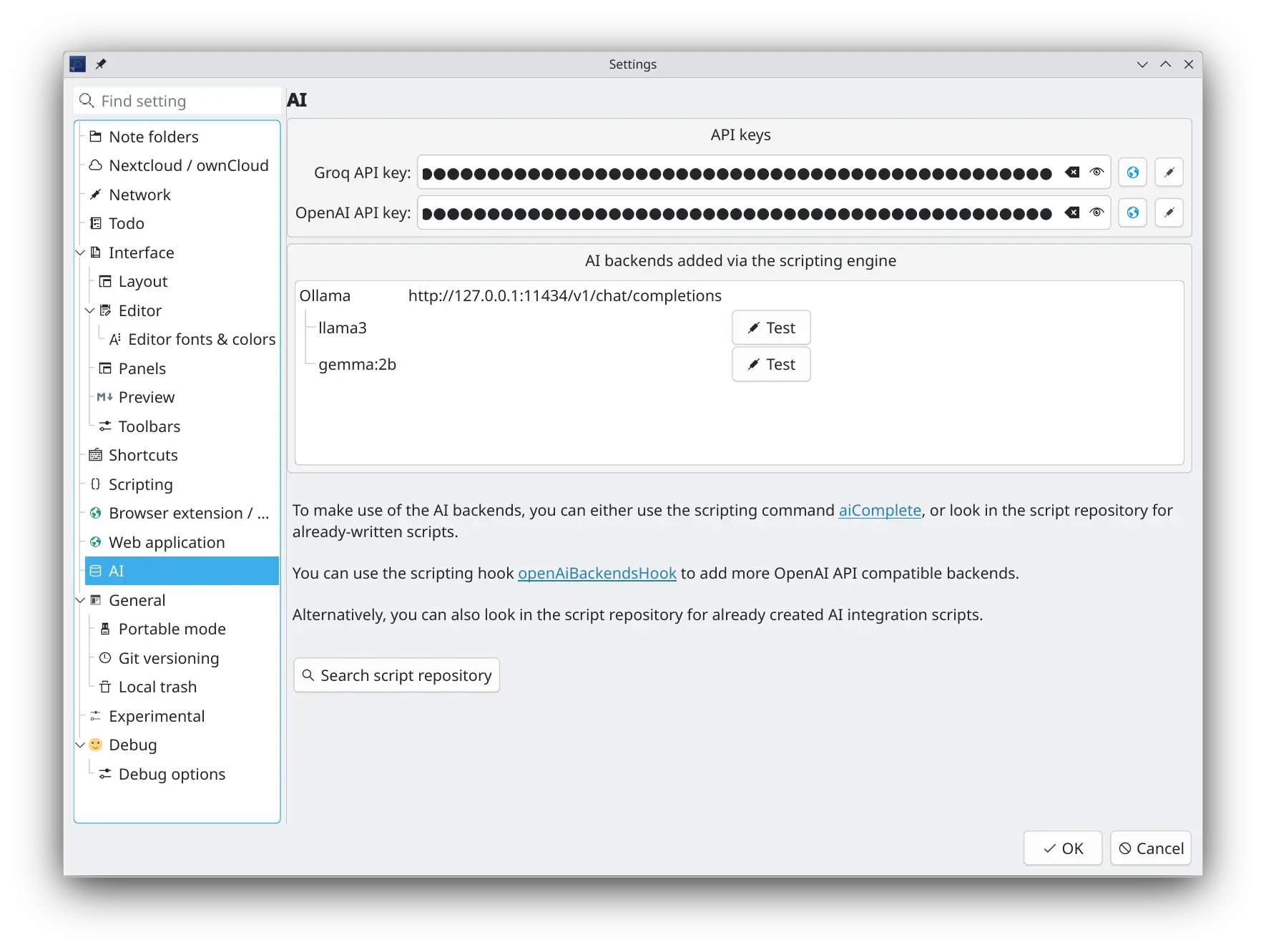
Vous pouvez choisir d’activer ou non votre modèle d’IA (LLM) favori pour vous aider avec vos notes. Par défaut, le logiciel vient avec un support pour Groq (parce que les clés d’API sont gratuites) et OpenAI, mais l’API interne est conçue pour être facilement extensible à d’autres modèles d’IA via des scripts. Plusieurs de ces scripts d’intégration de back-ends d’IA sont disponibles dans le dépôt de scripts pour vous aider à démarrer.
Conseil
L’API de complétion OpenAI a été implémentée pour être utilisée dans les scripts. De cette façon, vous pouvez faire ce que bon vous semble et expérimenter.
- Une barre d’outils d’IA et une section dans le menu principal « Édition » permettent d’activer le service et de sélectionner un back-end et un modèle d’IA
- Les nouvelles préférences d’IA permettent d’ajouter des clés d’API OpenAI et Groq
- Le dépôt de scripts contient plus d’intégrations de back-ends d’IA, comme Ollama et llama.cpp
- Vous pouvez utiliser la nouvelle commande de scripting
script.aiComplete(prompt)selon votre imagination- Pour plus d’informations, consultez la documentation sur le scripting
- Dans le dépôt de scripts est disponible pour commencer le script AI Autocompletion qui utilise le modèle d’IA sélectionné pour compléter automatiquement la sélection courante dans la fenêtre d’édition de note, ainsi que le scrpt AI Text Tool, qui utilise le modèle d’IA sélectionné pour traiter la sélection courante dans la fenêtre d’édition de note, par exemple pour la résumer, la traduire ou pour corriger les fautes d’orthographe, de grammaire ou de typographie
Serveur MCP
QOwnNotes inclut un serveur MCP (Model Context Protocol) permettant à des agents IA externes d’accéder à vos notes via HTTP avec la technologie Server-Sent Events (SSE).
Il est possible d’activer et de configurer le serveur MCP dans la page IA / serveur MCP des préférences.
- Activation et désactivation du serveur MCP
- Configuration du port (défaut : 22226)
- Jeton d’authentification « Bearer » – un jeton de sécurité est automatiquement généré et doit être inclus en tant que jeton
Bearerdans l’en-têteAuthorizationde chaque requête
Outils MCP disponibles
Le serveur MCP expose les outils suivants aux agents IA :
search_notes– Recherche dans le texte entier de toutes les notes du dossier de notes courant. Accepte un paramètrequeryde type chaîne de caractères et un paramètre optionnellimit(défaut : 20). Renvoie les noms des notes correspondantes et une courte prévisualisation de chacune d’entre elles.fetch_note– Récupère le contenu entier d’une seule note à partir de sonname(nom) ouid. Renvoie le texte de la note, le nom du fichier, et l’identifiant de la note.
Connexion d’un agent d’IA
Les agents IA se connectent au serveur MCP à l’aide de HTTP et SSE :
- Point de terminaison SSE
GET http://localhost:22226/sse
Ouvre le flux Server-Sent Events. Le serveur envoie un évènementendpointcontenant l’URL pour envoyer des messages JSON-RPC. - Point de terminaison des messages :
POST http://localhost:22226/message?sessionId=<id>
Envoyez les requêtes MCP JSON-RPC ici. La réponse est délivrée via le flux SSE.
Toutes les requêtes doivent inclure l’en-tête :
Authorization: Bearer <your-security-token>
Exemples de requêtes curl
Configurez d’abord le token et le port :
export TOKEN="votre-token-mcp"
export PORT=22226
Ouvrez le flux SSE dans un terminal :
curl -N \
  -H "Accept: text/event-stream" \
  -H "Authorization: Bearer $TOKEN" \
  "http://localhost:$PORT/sse"
Le serveur enverra un évènement endpoint contenant une URL, par exemple :
event: endpoint
data: http://localhost:22226/message?sessionId=3d8c7b0e-...
Utilisez l’identifiant sessionId de cet évènement dans les requêtes suivantes. La requête POST en elle-même renvoie 202 Accepted ; la réponse JSON-RPC est délivrée via le flux SSE.
Initialisez la session MCP :
curl \
  -X POST \
  -H "Content-Type: application/json" \
  -H "Authorization: Bearer $TOKEN" \
  --data '{
    "jsonrpc": "2.0",
    "id": 1,
    "method": "initialize",
    "params": {}
  }' \
  "http://localhost:$PORT/message?sessionId=3d8c7b0e-..."
Listez les outils MCP disponibles :
curl \
  -X POST \
  -H "Content-Type: application/json" \
  -H "Authorization: Bearer $TOKEN" \
  --data '{
    "jsonrpc": "2.0",
    "id": 2,
    "method": "tools/list",
    "params": {}
  }' \
  "http://localhost:$PORT/message?sessionId=3d8c7b0e-..."
Rechercher parmi les notes :
curl \
  -X POST \
  -H "Content-Type: application/json" \
  -H "Authorization: Bearer $TOKEN" \
  --data '{
    "jsonrpc": "2.0",
    "id": 3,
    "method": "tools/call",
    "params": {
      "name": "search_notes",
      "arguments": {
        "query": "meeting notes",
        "limit": 5
      }
    }
  }' \
  "http://localhost:$PORT/message?sessionId=3d8c7b0e-..."
Récupérez une note par son nom :
curl \
  -X POST \
  -H "Content-Type: application/json" \
  -H "Authorization: Bearer $TOKEN" \
  --data '{
    "jsonrpc": "2.0",
    "id": 4,
    "method": "tools/call",
    "params": {
      "name": "fetch_note",
      "arguments": {
        "name": "Daily Journal"
      }
    }
  }' \
  "http://localhost:$PORT/message?sessionId=3d8c7b0e-..."
Récupérez une note par son identifiant :
curl \
  -X POST \
  -H "Content-Type: application/json" \
  -H "Authorization: Bearer $TOKEN" \
  --data '{
    "jsonrpc": "2.0",
    "id": 5,
    "method": "tools/call",
    "params": {
      "name": "fetch_note",
      "arguments": {
        "id": 123
      }
    }
  }' \
  "http://localhost:$PORT/message?sessionId=3d8c7b0e-..."