
QOwnNotesQOwnNotes
Commencer
Installation
  • Ask question
  • Ask for feature
  • Report bug
  • Telegram Channel
  • Matrix/Element.io Room
  • Gitter Chat
  • IRC Channel
  • Mastodon
  • Twitter
  • Facebook
Faire un don
  • English
  • Deutsch
  • Italiano
  • Français
  • Español
  • فارسی
  • Nederlands
  • Magyar
  • العربية
  • Polski
  • 한국어
GitHub
Commencer
Installation
  • Ask question
  • Ask for feature
  • Report bug
  • Telegram Channel
  • Matrix/Element.io Room
  • Gitter Chat
  • IRC Channel
  • Mastodon
  • Twitter
  • Facebook
Faire un don
  • English
  • Deutsch
  • Italiano
  • Français
  • Español
  • فارسی
  • Nederlands
  • Magyar
  • العربية
  • Polski
  • 한국어
GitHub
  • Commencer

    • Aperçu
    • Concept
    • Antisèche Markdown
    • Importer des notes
    • Paramètres de l'interface de ligne de commande
    • Extension de navigateur QOwnNotes Web Companion
    • API de suggestion Homepage
    • Gestionnaire de snippets en ligne de commande
    • TUI QOwnNotes
    • QOwnNotes Android
    • Application Web QOwnNotes
    • App QOwnNotesAPI Nextcloud
    • Panneau des relations entre les notes
    • Recherche de notes
    • Raccourcis
    • Contrôle de version avec git
  • Installation

    • Installation
    • Installer sur Ubuntu Linux, elementary OS et Linux Mint
    • Installer sur Microsoft Windows™
    • Installer sur macOS™
    • Installer sur Debian Linux
    • Installer sur openSUSE Linux
    • Installer sur Fedora Linux
    • Installer depuis Snap
    • Installer en tant que Flatpak
    • Installer en tant qu'AppImage
    • Installer via Nix
    • Installer sur Arch Linux
    • Installer sur Solus
    • Installer sur KaOS Linux
    • Installer sur CentOS Linux
    • Installer sur Raspberry Pi OS
    • Installer sur Gentoo Linux
    • Installer sur Funtoo Linux
    • Installer sur Void Linux
    • Installer sur Slackware Linux
    • Installer sur FreeBSD
    • Compiler QOwnNotes
  • Éditeur

    • Vérification orthographique
    • LanguageTool
    • Harper
    • LSP Markdown
    • Support de l’intelligence artificielle (IA)
    • Formats d’horodatage
  • Scripting

    • Scripts QOwnNotes
    • Méthodes et objets fournis par QOwnNotes
    • Hooks
    • Classes exposées
  • Contribuer

    • Contribuer
    • Contributions sur le code source
    • Code de Conduite
    • Mainteneurs
    • Traduction
    • Faire un don
    • Les sponsors
  • FAQ

    • Comment puis-je simplement afficher le panneau d'aperçu sans le panneau d'édition des notes ?
    • Comment puis-je savoir ce que les autres disent au sujet de QOwnNotes ?
    • Pourquoi des statistiques d'utilisation ?
  • Blog (en anglais)

    • Overview
    • QOwnNotes for Android - Markdown notes on your phone
    • QOwnNotes TUI - Your notes in the terminal
    • Layouts and layout presets
    • QOwnNotes Webpage Relaunch with VuePress 2, Vue.js 3, and Vuetify 3
    • Universal binary for macOS
    • Note relations panel
    • AI support was added to QOwnNotes
    • Source Archive switched from TuxFamily to GitHub Releases
    • Nextcloud Deck integration in QOwnNotes
    • QOwnNotes UI End2End Tests with the help of NixOS
    • Please test Qt6 version of QOwnNotes from a new PPA for Ubuntu Linux
    • Evernote import for huge files
    • Happy 1000th release of QOwnNotes
    • Polish website translation
    • Working with multiple notes
    • QOwnNotes command-line snippet manager
    • Nextcloud note versions
    • Manage orphaned image files and attachments
    • Linking of note headings
    • Tor Hidden Service Webpage
    • Use workspaces to manage different layouts of the user interface
    • Auto-complete text in note editor
    • Open links in the note editor
    • Solve simple equations in the note editor
    • Auto-format Markdown tables
    • QOwnNotes Mastodon page
    • Repository for Debian 11
    • Joplin import
    • Send photos from your mobile phone to QOwnNotes on the desktop
    • Four new languages added to the website
    • QOwnNotes Demo
    • Markdown explanation
    • Webpage translation
    • QOwnNotes for Ubuntu 21.04 Hirsute Hippo
    • QOwnNotes for Fedora 33
    • Release and blog posting automation
    • Legacy update service up again
    • RSS Feeds are back in place
    • Time Flies Podcast episode with interview about QOwnNotes
    • Bookmark management with QOwnNotes and Web Companion browser extension
    • Firefox extension on Firefox Add-ons page
    • Chrome extension in Chrome Web Store
    • QOwnNotes Web Companion Chrome extension
    • 500th release of QOwnNotes
    • QOwnNotes Telegram Group
    • Vim mode
    • QOwnNotes for openSUSE Leap 15, SUSE Linux Enterprise 15 and SUSE Linux Enterprise 12 SP3
    • QOwnNotes featured on LINUX Unplugged podcast and by Ubuntu
    • Interview for ownCloud
    • QOwnNotes for Fedora 27
    • QOwnNotes reviewed in German magazine c't
    • QOwnNotesAPI in the ownCloud Marketplace
    • QOwnNotes as AppImage
    • QOwnNotes for Debian 9.0, Fedora 26 and openSUSE Leap 42.3
    • Script repository and script settings variables
    • Fedora 25 release and new documentation page
    • Solus package for QOwnNotes
    • Automatic updates in Windows and macOS
    • Note encryption with keybase.io or directly with PGP
    • Evernote import
    • Portable mode
    • QOwnNotes on webupd8.org
    • QOwnNotes featured on the Linux Voice Podcast
    • QOwnNotes snap
    • QOwnNotes review in British magazine Linux Format
    • QOwnNotes Slackware Linux Repository
    • QOwnNotes review
    • QOwnNotes IRC
    • QOwnNotes now has scripting support
    • QOwnNotes is the Desktop App Pick on the Linux Action Show
    • QOwnNotes got featured in Linux Voice 25
    • QOwnNotes Gentoo Linux Overlay
    • Translate QOwnNotes on Crowdin
    • QOwnNotes 1.0 out now in 6 languages and with Freedesktop theme icons support
    • QOwnNotes software repository for Debian Linux
    • QOwnNotes package on the Arch User Repository
    • QOwnNotes software repository for Arch Linux
    • Webpage redesign
    • Qt widget QMarkdownTextEdit now a separate project for developer's pleasure
    • New release version RSS feed
    • New Linux software repositories and todo list support
    • QOwnNotes on Linux Unplugged
    • Build and release systems for QOwnNotes for Linux, macOS and Windows!
    • Links to other notes or files are now possible in QOwnNotes
  • Changelog (en anglais)

    • QOwnNotes Changelog

TUI QOwnNotes

La TUI (interface terminal) de QOwnNotes est un navigateur et éditeur dans le terminal de dossiers locaux de notes Markdown compatibles avec QOwnNotes. Elle peut directement utiliser les dossiers de notes configurés dans QOwnNotes, vous permettant de commencer à travailler directement avec vos notes existantes.
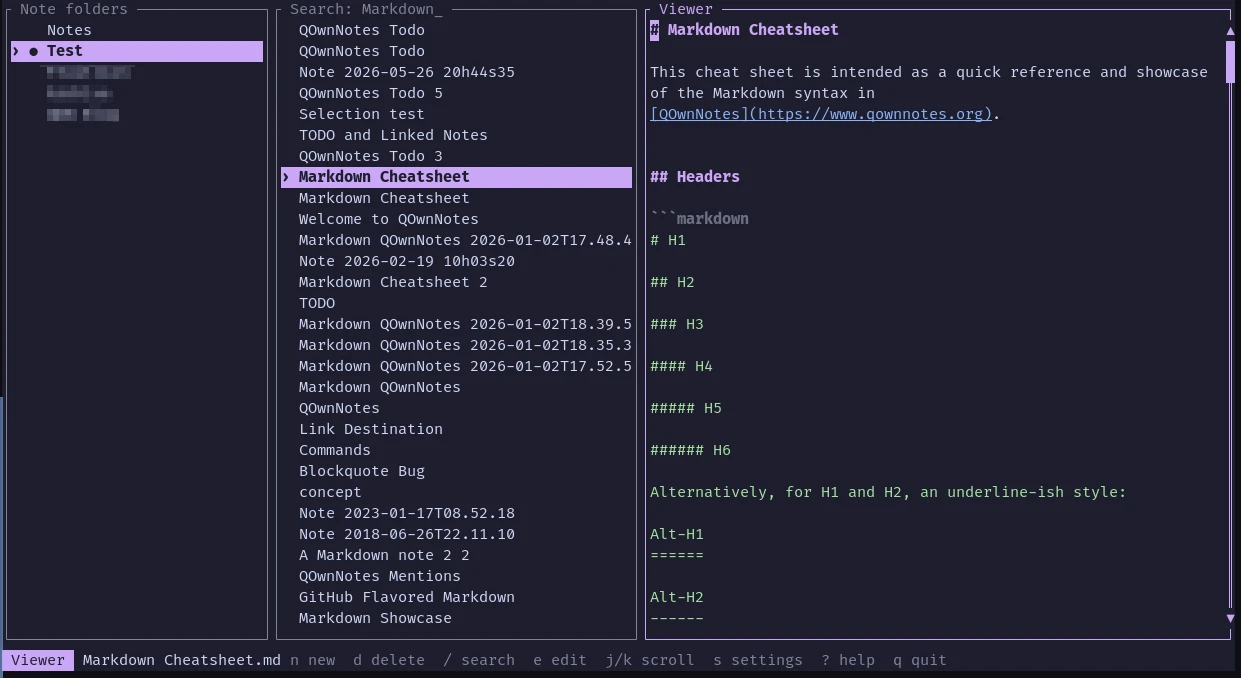
TUI QOwnNotes

  • Elle utilise les dossiers de notes configurés dans QOwnNotes et suit ses préférences en terme de tri de notes (la base de données d’application de QOwnNotes est ouverte en lecture-seule)
  • Il est possible de créer, modifier, rechercher, coloriser syntaxiquement, renommer et supprimer en sécurité des notes depuis le terminal
  • Les changements sont sauvegardés automatiquement et les conflits de changements externes sont détectés
  • Elle supporte des thèmes configurables, le contrôle par la souris, Nix et un module Home Manager
  • Les autocomplétions dans la console peuvent être générées pour Bash, Fish, Zsh et plus

Installation

Visitez la page de la dernière version et téléchargez la version qui vous convient.

Conseil

Si vous utilisez Nix, vous pouvez compiler et exécuter l’application directement :

nix run github:qownnotes/qownnotes-tui -- --notes-dir ~/Notes

Le paquet Nix installe les complétions pour Bash, Fish et Zsh automatiquement.

Utilisation

Ouvrir un dossier de notes depuis la ligne de commande :

qownnotes-tui --notes-dir ~/Notes

Si aucun dossier de note n’est donné, l’application lit tous les dossiers de notes configurés dans QOwnNotes et ouvre initialement le dossier courant.

Quelques-unes des touches les plus importantes :

ToucheAction
j, kDéplacer la sélection ou déplacer la fenêtre visible
h, l, TabChanger de panneau
EntréeActiver un dossier de notes ou ouvrir une note
n, Ctrl-nCréer une note horodatée
dSupprimer une note après confirmation
eModifier la note sélectionnée
/Rechercher parmi les noms et textes de notes
Ctrl-sSauvegarder la note
ÉchapQuitter l’éditeur ou revenir à la liste de notes
?Afficher l’aide
q, Ctrl-cQuitter

Conseil

Pour plus d’informations, visitez le dépôt de la TUI de QOwnNotes sur GitHub.

Prev
Gestionnaire de snippets en ligne de commande
Next
QOwnNotes Android