
QOwnNotes TUI
QOwnNotes TUI is a keyboard-first terminal browser and editor for local, QOwnNotes-compatible Markdown note folders. It can directly use the note folders configured in QOwnNotes, so you can start working with your existing notes right away.
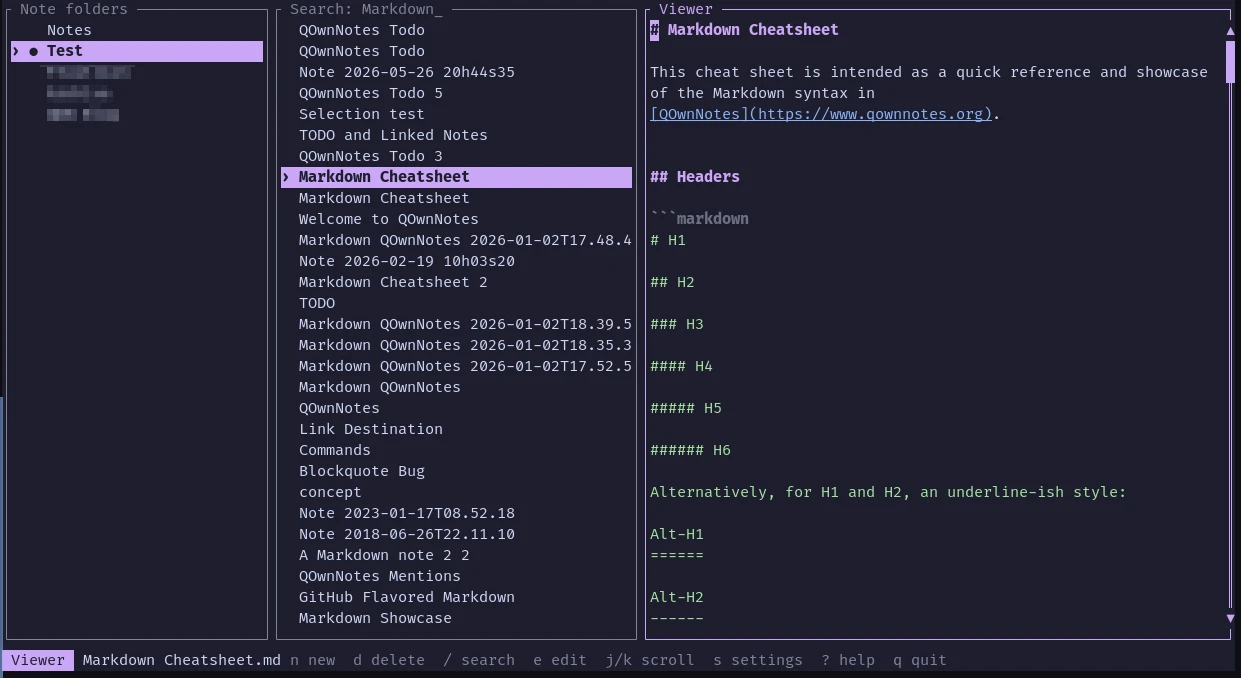
- It uses the note folders configured in QOwnNotes and follows its note sorting settings (the QOwnNotes application database is opened read-only)
- Notes can be created, edited, searched, syntax-highlighted, renamed from their content, and safely deleted from the terminal
- Changes are saved automatically and external-change conflicts are detected
- It supports configurable themes, mouse controls, Nix, and a Home Manager module
- Shell completions can be generated for Bash, Fish, Zsh, and more
Installation
Visit the latest release page and download the version you need.
Tips
If you are using Nix, you can build and run the application directly:
nix run github:qownnotes/qownnotes-tui -- --notes-dir ~/Notes
The Nix package installs shell completions for Bash, Fish, and Zsh automatically.
Usage
Open a note folder from the command line:
qownnotes-tui --notes-dir ~/Notes
If no note folder is given, the application reads all configured note folders from QOwnNotes and initially opens the current folder.
Some of the most important keys:
| Key | Action |
|---|---|
j, k | Move selection or scroll the viewer |
h, l, Tab | Switch panes |
Enter | Activate a note folder or open a note |
n, Ctrl-n | Create a timestamped note |
d | Delete a note after confirmation |
e | Edit the selected note |
/ | Search note names and text |
Ctrl-s | Save the note |
Esc | Leave editor or return to note list |
? | Show help |
q, Ctrl-c | Quit |
Tips
For more information, visit the QOwnNotes TUI repository on GitHub.