
QOwnNotesQOwnNotes
Rozpoczęcie
Instalacja
  • Ask question
  • Ask for feature
  • Report bug
  • Telegram Channel
  • Matrix/Element.io Room
  • Gitter Chat
  • IRC Channel
  • Mastodon
  • Twitter
  • Facebook
Wesprzyj
  • English
  • Deutsch
  • Italiano
  • Français
  • Español
  • فارسی
  • Nederlands
  • Magyar
  • العربية
  • Polski
  • 한국어
GitHub
Rozpoczęcie
Instalacja
  • Ask question
  • Ask for feature
  • Report bug
  • Telegram Channel
  • Matrix/Element.io Room
  • Gitter Chat
  • IRC Channel
  • Mastodon
  • Twitter
  • Facebook
Wesprzyj
  • English
  • Deutsch
  • Italiano
  • Français
  • Español
  • فارسی
  • Nederlands
  • Magyar
  • العربية
  • Polski
  • 한국어
GitHub
  • Rozpoczęcie

    • Przegląd
    • Pojęcie
    • Markdown Cheatsheet
    • Importowanie notatek
    • Argumenty interfejsu wiersza poleceń
    • Rozszerzenie przeglądarki QOwnNotes Web Companion
    • Homepage suggestion API
    • Command-line Snippet Manager
    • QOwnNotes TUI
    • QOwnNotes Android
    • QOwnNotes Web App
    • QOwnNotesAPI Nextcloud App
    • Note relations panel
    • Wyszukiwanie notatek
    • Skróty
    • Git versioning
  • Instalacja

    • Instalacja
    • Instalacja w systemie Ubuntu Linux, elementary OS oraz Linux Mint
    • Zainstaluj w systemie Microsoft Windows™
    • Install on macOS™
    • Zainstaluj na Debian Linux
    • Zainstaluj na openSUSE Linux
    • Zainstaluj w Fedorze Linux
    • Install as Snap
    • Zainstaluj jako Flatpak
    • Instalacja jako AppImage
    • Install via Nix
    • Zainstaluj na Arch Linux
    • Zainstaluj na Solus
    • Zainstaluj na KaOS Linux
    • Zainstaluj na CentOS Linux
    • Zainstaluj na Raspberry Pi OS
    • Zainstaluj na Gentoo Linux
    • Install on Funtoo Linux
    • Install on Void Linux
    • Zainstaluj na Slackware Linux
    • Install on FreeBSD
    • Building QOwnNotes
  • Edytor

    • Sprawdzanie pisowni
    • LanguageTool
    • Harper
    • Markdown LSP
    • AI support
    • Formaty czasu
  • Skrypty

    • QOwnNotes Scripting
    • Methods and objects QOwnNotes provides
    • Haki
    • Odsłonięte zajęcia
  • Współpraca

    • Zaangażuj się w projekt
    • Code contributions
    • Code of Conduct
    • Opiekunowie
    • Tłumaczenie
    • Wspomóż projekt
    • Sponsorzy
  • FAQ

    • Jak mogę wyświetlić sam panel podglądu bez panelu edycji notatki?
    • Gdzie mogę znaleźć opinie innych użytkowników o QOwnNotes?
    • Dlaczego metryki?
  • Blog (po angielsku)

    • Overview
    • QOwnNotes for Android - Markdown notes on your phone
    • QOwnNotes TUI - Your notes in the terminal
    • Layouts and layout presets
    • QOwnNotes Webpage Relaunch with VuePress 2, Vue.js 3, and Vuetify 3
    • Universal binary for macOS
    • Note relations panel
    • AI support was added to QOwnNotes
    • Source Archive switched from TuxFamily to GitHub Releases
    • Nextcloud Deck integration in QOwnNotes
    • QOwnNotes UI End2End Tests with the help of NixOS
    • Please test Qt6 version of QOwnNotes from a new PPA for Ubuntu Linux
    • Evernote import for huge files
    • Happy 1000th release of QOwnNotes
    • Polish website translation
    • Working with multiple notes
    • QOwnNotes command-line snippet manager
    • Nextcloud note versions
    • Manage orphaned image files and attachments
    • Linking of note headings
    • Tor Hidden Service Webpage
    • Use workspaces to manage different layouts of the user interface
    • Auto-complete text in note editor
    • Open links in the note editor
    • Solve simple equations in the note editor
    • Auto-format Markdown tables
    • QOwnNotes Mastodon page
    • Repository for Debian 11
    • Joplin import
    • Send photos from your mobile phone to QOwnNotes on the desktop
    • Four new languages added to the website
    • QOwnNotes Demo
    • Markdown explanation
    • Webpage translation
    • QOwnNotes for Ubuntu 21.04 Hirsute Hippo
    • QOwnNotes for Fedora 33
    • Release and blog posting automation
    • Legacy update service up again
    • RSS Feeds are back in place
    • Time Flies Podcast episode with interview about QOwnNotes
    • Bookmark management with QOwnNotes and Web Companion browser extension
    • Firefox extension on Firefox Add-ons page
    • Chrome extension in Chrome Web Store
    • QOwnNotes Web Companion Chrome extension
    • 500th release of QOwnNotes
    • QOwnNotes Telegram Group
    • Vim mode
    • QOwnNotes for openSUSE Leap 15, SUSE Linux Enterprise 15 and SUSE Linux Enterprise 12 SP3
    • QOwnNotes featured on LINUX Unplugged podcast and by Ubuntu
    • Interview for ownCloud
    • QOwnNotes for Fedora 27
    • QOwnNotes reviewed in German magazine c't
    • QOwnNotesAPI in the ownCloud Marketplace
    • QOwnNotes as AppImage
    • QOwnNotes for Debian 9.0, Fedora 26 and openSUSE Leap 42.3
    • Script repository and script settings variables
    • Fedora 25 release and new documentation page
    • Solus package for QOwnNotes
    • Automatic updates in Windows and macOS
    • Note encryption with keybase.io or directly with PGP
    • Evernote import
    • Portable mode
    • QOwnNotes on webupd8.org
    • QOwnNotes featured on the Linux Voice Podcast
    • QOwnNotes snap
    • QOwnNotes review in British magazine Linux Format
    • QOwnNotes Slackware Linux Repository
    • QOwnNotes review
    • QOwnNotes IRC
    • QOwnNotes now has scripting support
    • QOwnNotes is the Desktop App Pick on the Linux Action Show
    • QOwnNotes got featured in Linux Voice 25
    • QOwnNotes Gentoo Linux Overlay
    • Translate QOwnNotes on Crowdin
    • QOwnNotes 1.0 out now in 6 languages and with Freedesktop theme icons support
    • QOwnNotes software repository for Debian Linux
    • QOwnNotes package on the Arch User Repository
    • QOwnNotes software repository for Arch Linux
    • Webpage redesign
    • Qt widget QMarkdownTextEdit now a separate project for developer's pleasure
    • New release version RSS feed
    • New Linux software repositories and todo list support
    • QOwnNotes on Linux Unplugged
    • Build and release systems for QOwnNotes for Linux, macOS and Windows!
    • Links to other notes or files are now possible in QOwnNotes
  • Dziennik zmian (po angielsku)

    • QOwnNotes Changelog

QOwnNotes TUI

QOwnNotes TUI is a keyboard-first terminal browser and editor for local, QOwnNotes-compatible Markdown note folders. It can directly use the note folders configured in QOwnNotes, so you can start working with your existing notes right away.
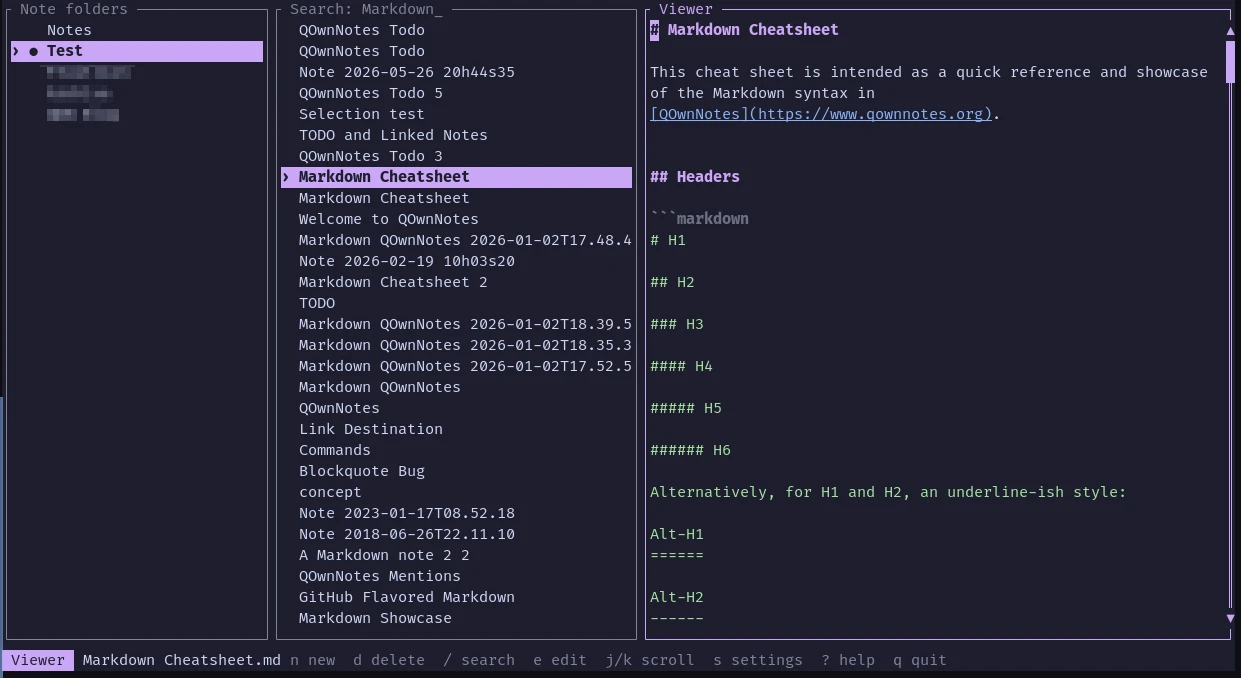
QOwnNotes TUI

  • It uses the note folders configured in QOwnNotes and follows its note sorting settings (the QOwnNotes application database is opened read-only)
  • Notes can be created, edited, searched, syntax-highlighted, renamed from their content, and safely deleted from the terminal
  • Changes are saved automatically and external-change conflicts are detected
  • It supports configurable themes, mouse controls, Nix, and a Home Manager module
  • Shell completions can be generated for Bash, Fish, Zsh, and more

Installation

Visit the latest release page and download the version you need.

Porady

If you are using Nix, you can build and run the application directly:

nix run github:qownnotes/qownnotes-tui -- --notes-dir ~/Notes

The Nix package installs shell completions for Bash, Fish, and Zsh automatically.

Usage

Open a note folder from the command line:

qownnotes-tui --notes-dir ~/Notes

If no note folder is given, the application reads all configured note folders from QOwnNotes and initially opens the current folder.

Some of the most important keys:

KeyAction
j, kMove selection or scroll the viewer
h, l, TabSwitch panes
EnterActivate a note folder or open a note
n, Ctrl-nCreate a timestamped note
dDelete a note after confirmation
eEdit the selected note
/Search note names and text
Ctrl-sSave the note
EscLeave editor or return to note list
?Show help
q, Ctrl-cQuit

Porady

For more information, visit the QOwnNotes TUI repository on GitHub.

Prev
Command-line Snippet Manager
Next
QOwnNotes Android