
QOwnNotesQOwnNotes
Commencer
Installation
  • Ask question
  • Ask for feature
  • Report bug
  • Telegram Channel
  • Matrix/Element.io Room
  • Gitter Chat
  • IRC Channel
  • Mastodon
  • Twitter
  • Facebook
Faire un don
  • English
  • Deutsch
  • Italiano
  • Français
  • Español
  • ÙŰ§Ű±ŰłÛŒ
  • Nederlands
  • Magyar
  • Ű§Ù„ŰčŰ±ŰšÙŠŰ©
  • Polski
  • 한ꔭ얎
GitHub
Commencer
Installation
  • Ask question
  • Ask for feature
  • Report bug
  • Telegram Channel
  • Matrix/Element.io Room
  • Gitter Chat
  • IRC Channel
  • Mastodon
  • Twitter
  • Facebook
Faire un don
  • English
  • Deutsch
  • Italiano
  • Français
  • Español
  • ÙŰ§Ű±ŰłÛŒ
  • Nederlands
  • Magyar
  • Ű§Ù„ŰčŰ±ŰšÙŠŰ©
  • Polski
  • 한ꔭ얎
GitHub
  • Commencer

    • Aperçu
    • Concept
    • AntisĂšche Markdown
    • Importer des notes
    • ParamĂštres de l'interface de ligne de commande
    • Extension de navigateur QOwnNotes Web Companion
    • API de suggestion Homepage
    • Gestionnaire de snippets en ligne de commande
    • TUI QOwnNotes
    • QOwnNotes Android
    • Application Web QOwnNotes
    • QOwnNotes Nextcloud App
    • Panneau des relations entre les notes
    • Recherche de notes
    • Raccourcis
    • ContrĂŽle de version avec git
    • /fr/getting-started/kde-integration.html
  • Installation

    • Installation
    • Installer sur Ubuntu Linux, elementary OS et Linux Mint
    • Installer sur Microsoft Windowsℱ
    • Installer sur macOSℱ
    • Installer sur Debian Linux
    • Installer sur openSUSE Linux
    • Installer sur Fedora Linux
    • Installer depuis Snap
    • Installer en tant que Flatpak
    • Installer en tant qu'AppImage
    • Installer via Nix
    • Installer sur Arch Linux
    • Installer sur Solus
    • Installer sur KaOS Linux
    • Installer sur CentOS Linux
    • Installer sur Raspberry Pi OS
    • Installer sur Gentoo Linux
    • Installer sur Funtoo Linux
    • Installer sur Void Linux
    • Installer sur Slackware Linux
    • Installer sur FreeBSD
    • Compiler QOwnNotes
  • Éditeur

    • VĂ©rification orthographique
    • LanguageTool
    • Harper
    • LSP Markdown
    • Support de l’intelligence artificielle (IA)
    • Formats d’horodatage
  • Scripting

    • Scripts QOwnNotes
    • MĂ©thodes et objets fournis par QOwnNotes
    • Hooks
    • Classes exposĂ©es
  • Contribuer

    • Contribuer
    • Contributions sur le code source
    • Code de Conduite
    • Mainteneurs
    • Traduction
    • Faire un don
    • Les sponsors
  • FAQ

    • Comment puis-je simplement afficher le panneau d'aperçu sans le panneau d'Ă©dition des notes ?
    • Comment puis-je savoir ce que les autres disent au sujet de QOwnNotes ?
    • Pourquoi des statistiques d'utilisation ?
  • Blog (en anglais)

    • Overview
    • QOwnNotes for Nextcloud - Your notes in the Nextcloud web interface
    • QOwnNotes for Android - Markdown notes on your phone
    • QOwnNotes TUI - Your notes in the terminal
    • Layouts and layout presets
    • QOwnNotes Webpage Relaunch with VuePress 2, Vue.js 3, and Vuetify 3
    • Universal binary for macOS
    • Note relations panel
    • AI support was added to QOwnNotes
    • Source Archive switched from TuxFamily to GitHub Releases
    • Nextcloud Deck integration in QOwnNotes
    • QOwnNotes UI End2End Tests with the help of NixOS
    • Please test Qt6 version of QOwnNotes from a new PPA for Ubuntu Linux
    • Evernote import for huge files
    • Happy 1000th release of QOwnNotes
    • Polish website translation
    • Working with multiple notes
    • QOwnNotes command-line snippet manager
    • Nextcloud note versions
    • Manage orphaned image files and attachments
    • Linking of note headings
    • Tor Hidden Service Webpage
    • Use workspaces to manage different layouts of the user interface
    • Auto-complete text in note editor
    • Open links in the note editor
    • Solve simple equations in the note editor
    • Auto-format Markdown tables
    • QOwnNotes Mastodon page
    • Repository for Debian 11
    • Joplin import
    • Send photos from your mobile phone to QOwnNotes on the desktop
    • Four new languages added to the website
    • QOwnNotes Demo
    • Markdown explanation
    • Webpage translation
    • QOwnNotes for Ubuntu 21.04 Hirsute Hippo
    • QOwnNotes for Fedora 33
    • Release and blog posting automation
    • Legacy update service up again
    • RSS Feeds are back in place
    • Time Flies Podcast episode with interview about QOwnNotes
    • Bookmark management with QOwnNotes and Web Companion browser extension
    • Firefox extension on Firefox Add-ons page
    • Chrome extension in Chrome Web Store
    • QOwnNotes Web Companion Chrome extension
    • 500th release of QOwnNotes
    • QOwnNotes Telegram Group
    • Vim mode
    • QOwnNotes for openSUSE Leap 15, SUSE Linux Enterprise 15 and SUSE Linux Enterprise 12 SP3
    • QOwnNotes featured on LINUX Unplugged podcast and by Ubuntu
    • Interview for ownCloud
    • QOwnNotes for Fedora 27
    • QOwnNotes reviewed in German magazine c't
    • QOwnNotesAPI in the ownCloud Marketplace
    • QOwnNotes as AppImage
    • QOwnNotes for Debian 9.0, Fedora 26 and openSUSE Leap 42.3
    • Script repository and script settings variables
    • Fedora 25 release and new documentation page
    • Solus package for QOwnNotes
    • Automatic updates in Windows and macOS
    • Note encryption with keybase.io or directly with PGP
    • Evernote import
    • Portable mode
    • QOwnNotes on webupd8.org
    • QOwnNotes featured on the Linux Voice Podcast
    • QOwnNotes snap
    • QOwnNotes review in British magazine Linux Format
    • QOwnNotes Slackware Linux Repository
    • QOwnNotes review
    • QOwnNotes IRC
    • QOwnNotes now has scripting support
    • QOwnNotes is the Desktop App Pick on the Linux Action Show
    • QOwnNotes got featured in Linux Voice 25
    • QOwnNotes Gentoo Linux Overlay
    • Translate QOwnNotes on Crowdin
    • QOwnNotes 1.0 out now in 6 languages and with Freedesktop theme icons support
    • QOwnNotes software repository for Debian Linux
    • QOwnNotes package on the Arch User Repository
    • QOwnNotes software repository for Arch Linux
    • Webpage redesign
    • Qt widget QMarkdownTextEdit now a separate project for developer's pleasure
    • New release version RSS feed
    • New Linux software repositories and todo list support
    • QOwnNotes on Linux Unplugged
    • Build and release systems for QOwnNotes for Linux, macOS and Windows!
    • Links to other notes or files are now possible in QOwnNotes
  • Changelog (en anglais)

    • QOwnNotes Changelog

QOwnNotes Android

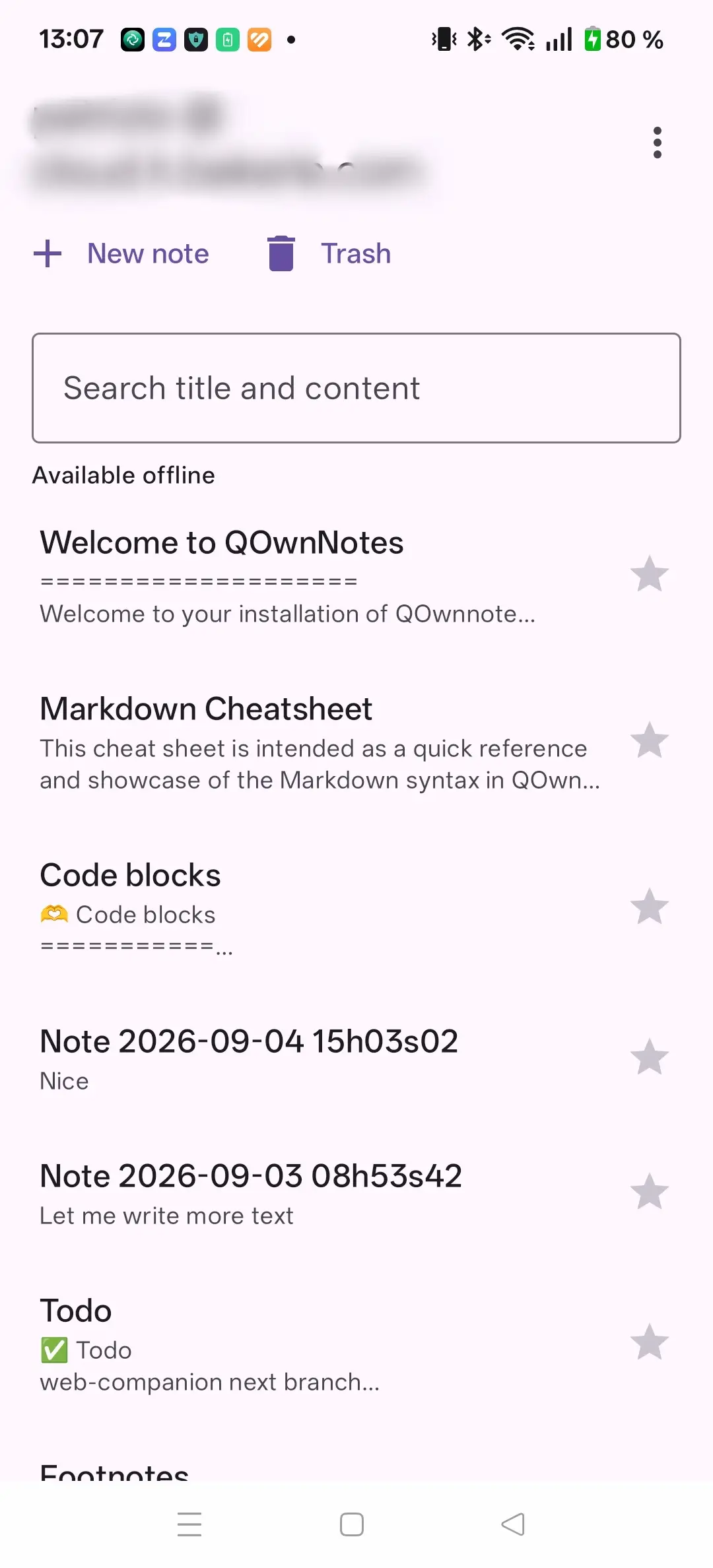
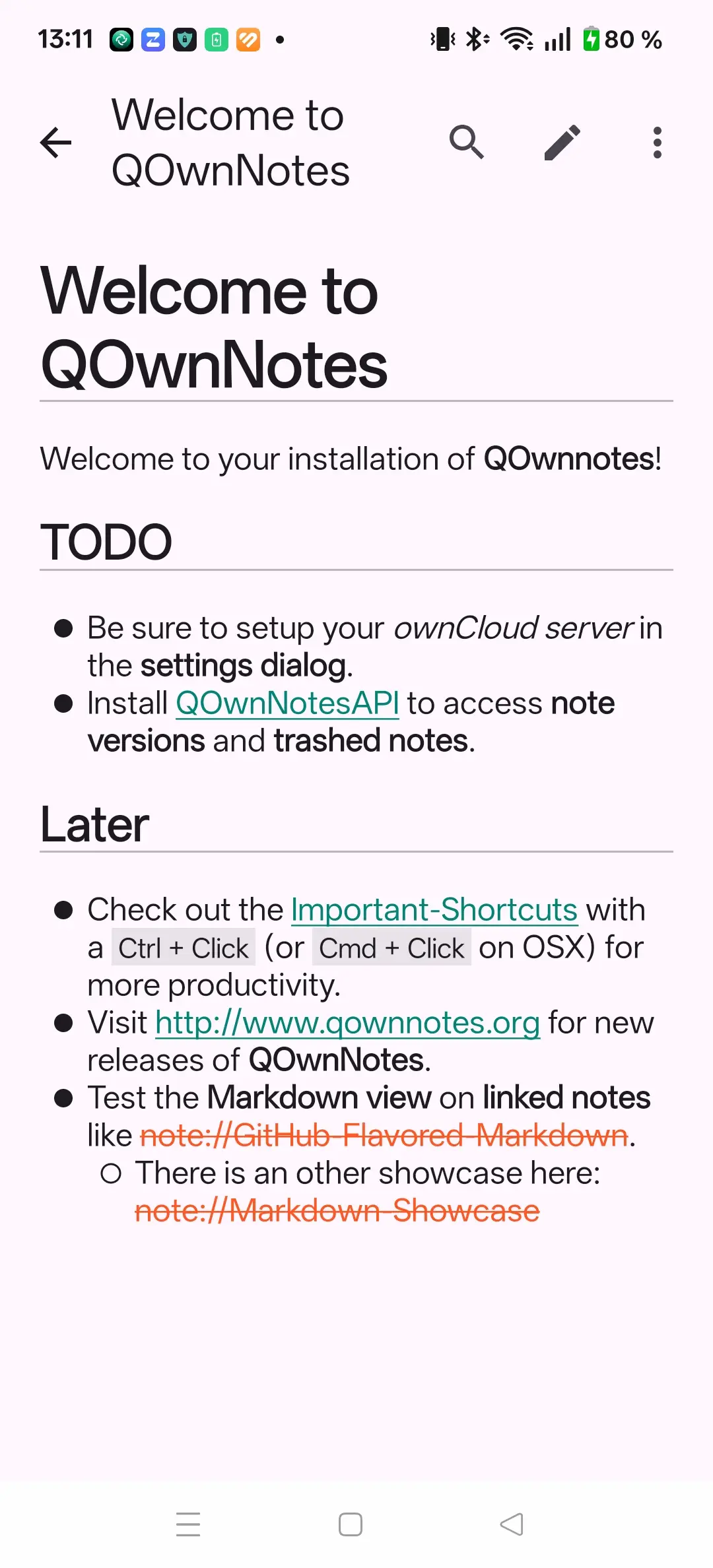
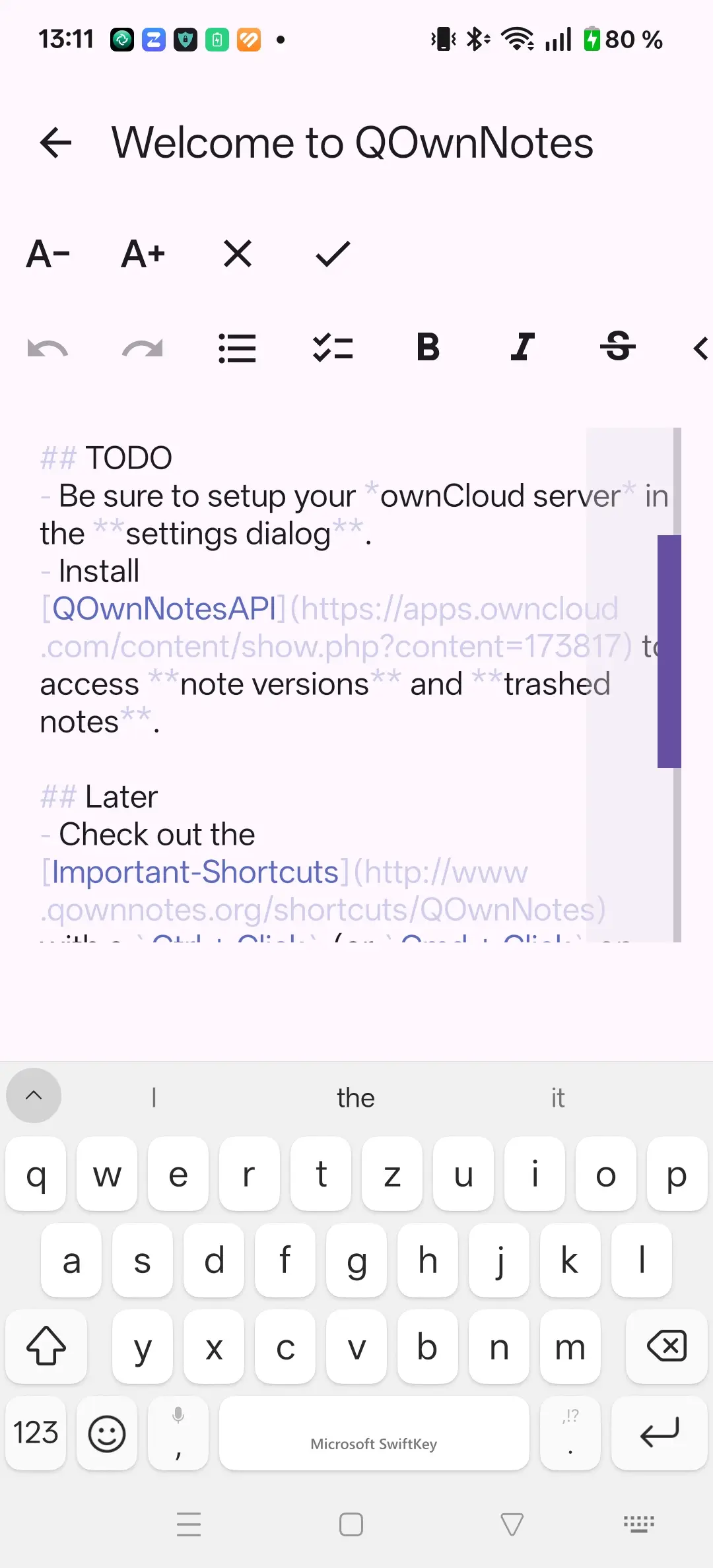
QOwnNotes Android note listQOwnNotes Android note viewQOwnNotes Android note edit

QOwnNotes pour Android est une application pouvant fonctionner hors-ligne de notes Markdown pour Android qui se synchronise avec votre serveur Nextcloud à travers l’API Nextcloud Notes et l’application QOwnNotesAPI.

Elle interagit directement avec Nextcloud Notes et QOwnNotesAPI sur votre serveur Nextcloud, vous donnant accĂšs Ă  la synchronisation des notes, Ă  l’historique distant de versions de notes et Ă  la corbeille distante, le tout depuis votre tĂ©lĂ©phone.

Fonctionnalités

  • OrientĂ© hors-ligne : utilisation d’une base de donnĂ©es Room comme source locale de vĂ©ritĂ©, les modifications sont immĂ©diatement mises en caches et sont synchronisĂ©es quand le serveur est atteignable
  • API Nextcloud Notes 1.2+ avec poussages automatiques, ETags, et mises Ă  jour sans conflits
  • Import de l’authentification unique (SSO) depuis l’application Android Nextcloud Files
  • Historique de versions de notes et exploration de la corbeille distante via l’application Nextcloud optionnelle QOwnNotesAPI
  • Favoris avec possibilitĂ© de les garder hors-ligne et d’effectuer un tri avec les favoris en premier
  • PrĂ©visualisation Markdown supportant CommonMark, GitHub Flavored Markdown, les listes de cases Ă  cocher Ă  trois Ă©tats (Ă  faire, fait et partiel), les liens-wiki, les tableaux, les blocs de code dĂ©limitĂ©s et les images distantes
  • Éditeur Markdown avec des actions de formatage, annuler/rĂ©tablir, prĂ©servation de curseur et persistance des brouillons locaux
  • Partager pour crĂ©er des notes Ă  partir de texte partagĂ© par les autres applications Android
  • ThĂšmes clair et sombre sur Android 9+

Installation

Visitez la page de derniĂšre version et tĂ©lĂ©chargez l’APK.

Des versions de dĂ©veloppement sont construites et publiĂ©es en parallĂšle des versions stables et peuvent ĂȘtre installĂ©es simultanĂ©ment (avec deux identifiants d’application diffĂ©rents).

Configuration de compte Nextcloud

  1. Installez l’application Android Nextcloud Files et connectez-vous à votre serveur.
  2. Ouvrez QOwnNotes pour Android et choisissez Ajouter un compte Nextcloud.
  3. L’application requiert l’application Nextcloud Notes sur votre serveur avec l’API Notes 1.2 ou une version ultĂ©rieure.
  4. Si vous installez aussi l’application Nextcloud QOwnNotesAPI, vous obtenez l’accùs à votre historique de versions de notes et à la corbeille distante.

Conseil

Les identifiants/mots de passe restent dans l’intĂ©gration SSO de Nextcloud et ne sont pas copiĂ©s dans la base de donnĂ©es de QOwnNotes.

DiffĂ©rences principales avec l’application mobile Nextcloud Notes

FonctionnalitéQOwnNotes AndroidNextcloud Notes mobile
Modification hors-ligne avec détection de conflitsOuiLimité
Historique de versions de notes via QOwnNotesAPIOuiNon
Corbeille distante et restaurationOuiNon
Favoris avec option hors-ligneOuiNon
Liste de cases à cocher à trois étatsOuiNon
Liens-wiki et prise en charge des anciers liens note://OuiNon

Plus d’informations

  • DĂ©pĂŽt GitHub
  • Journal de modifications
Prev
TUI QOwnNotes
Next
Application Web QOwnNotes