
QOwnNotesQOwnNotes
Rozpoczęcie
Instalacja
  • Ask question
  • Ask for feature
  • Report bug
  • Telegram Channel
  • Matrix/Element.io Room
  • Gitter Chat
  • IRC Channel
  • Mastodon
  • Twitter
  • Facebook
Wesprzyj
  • English
  • Deutsch
  • Italiano
  • Français
  • Español
  • فارسی
  • Nederlands
  • Magyar
  • العربية
  • Polski
  • 한국어
GitHub
Rozpoczęcie
Instalacja
  • Ask question
  • Ask for feature
  • Report bug
  • Telegram Channel
  • Matrix/Element.io Room
  • Gitter Chat
  • IRC Channel
  • Mastodon
  • Twitter
  • Facebook
Wesprzyj
  • English
  • Deutsch
  • Italiano
  • Français
  • Español
  • فارسی
  • Nederlands
  • Magyar
  • العربية
  • Polski
  • 한국어
GitHub
  • Rozpoczęcie

    • Przegląd
    • Pojęcie
    • Markdown Cheatsheet
    • Importowanie notatek
    • Argumenty interfejsu wiersza poleceń
    • Rozszerzenie przeglądarki QOwnNotes Web Companion
    • Homepage suggestion API
    • Command-line Snippet Manager
    • QOwnNotes TUI
    • QOwnNotes Android
    • QOwnNotes Web App
    • QOwnNotesAPI Nextcloud App
    • Note relations panel
    • Wyszukiwanie notatek
    • Skróty
    • Git versioning
  • Instalacja

    • Instalacja
    • Instalacja w systemie Ubuntu Linux, elementary OS oraz Linux Mint
    • Zainstaluj w systemie Microsoft Windows™
    • Install on macOS™
    • Zainstaluj na Debian Linux
    • Zainstaluj na openSUSE Linux
    • Zainstaluj w Fedorze Linux
    • Install as Snap
    • Zainstaluj jako Flatpak
    • Instalacja jako AppImage
    • Install via Nix
    • Zainstaluj na Arch Linux
    • Zainstaluj na Solus
    • Zainstaluj na KaOS Linux
    • Zainstaluj na CentOS Linux
    • Zainstaluj na Raspberry Pi OS
    • Zainstaluj na Gentoo Linux
    • Install on Funtoo Linux
    • Install on Void Linux
    • Zainstaluj na Slackware Linux
    • Install on FreeBSD
    • Building QOwnNotes
  • Edytor

    • Sprawdzanie pisowni
    • LanguageTool
    • Harper
    • Markdown LSP
    • AI support
    • Formaty czasu
  • Skrypty

    • QOwnNotes Scripting
    • Methods and objects QOwnNotes provides
    • Haki
    • Odsłonięte zajęcia
  • Współpraca

    • Zaangażuj się w projekt
    • Code contributions
    • Code of Conduct
    • Opiekunowie
    • Tłumaczenie
    • Wspomóż projekt
    • Sponsorzy
  • FAQ

    • Jak mogę wyświetlić sam panel podglądu bez panelu edycji notatki?
    • Gdzie mogę znaleźć opinie innych użytkowników o QOwnNotes?
    • Dlaczego metryki?
  • Blog (po angielsku)

    • Overview
    • QOwnNotes for Android - Markdown notes on your phone
    • QOwnNotes TUI - Your notes in the terminal
    • Layouts and layout presets
    • QOwnNotes Webpage Relaunch with VuePress 2, Vue.js 3, and Vuetify 3
    • Universal binary for macOS
    • Note relations panel
    • AI support was added to QOwnNotes
    • Source Archive switched from TuxFamily to GitHub Releases
    • Nextcloud Deck integration in QOwnNotes
    • QOwnNotes UI End2End Tests with the help of NixOS
    • Please test Qt6 version of QOwnNotes from a new PPA for Ubuntu Linux
    • Evernote import for huge files
    • Happy 1000th release of QOwnNotes
    • Polish website translation
    • Working with multiple notes
    • QOwnNotes command-line snippet manager
    • Nextcloud note versions
    • Manage orphaned image files and attachments
    • Linking of note headings
    • Tor Hidden Service Webpage
    • Use workspaces to manage different layouts of the user interface
    • Auto-complete text in note editor
    • Open links in the note editor
    • Solve simple equations in the note editor
    • Auto-format Markdown tables
    • QOwnNotes Mastodon page
    • Repository for Debian 11
    • Joplin import
    • Send photos from your mobile phone to QOwnNotes on the desktop
    • Four new languages added to the website
    • QOwnNotes Demo
    • Markdown explanation
    • Webpage translation
    • QOwnNotes for Ubuntu 21.04 Hirsute Hippo
    • QOwnNotes for Fedora 33
    • Release and blog posting automation
    • Legacy update service up again
    • RSS Feeds are back in place
    • Time Flies Podcast episode with interview about QOwnNotes
    • Bookmark management with QOwnNotes and Web Companion browser extension
    • Firefox extension on Firefox Add-ons page
    • Chrome extension in Chrome Web Store
    • QOwnNotes Web Companion Chrome extension
    • 500th release of QOwnNotes
    • QOwnNotes Telegram Group
    • Vim mode
    • QOwnNotes for openSUSE Leap 15, SUSE Linux Enterprise 15 and SUSE Linux Enterprise 12 SP3
    • QOwnNotes featured on LINUX Unplugged podcast and by Ubuntu
    • Interview for ownCloud
    • QOwnNotes for Fedora 27
    • QOwnNotes reviewed in German magazine c't
    • QOwnNotesAPI in the ownCloud Marketplace
    • QOwnNotes as AppImage
    • QOwnNotes for Debian 9.0, Fedora 26 and openSUSE Leap 42.3
    • Script repository and script settings variables
    • Fedora 25 release and new documentation page
    • Solus package for QOwnNotes
    • Automatic updates in Windows and macOS
    • Note encryption with keybase.io or directly with PGP
    • Evernote import
    • Portable mode
    • QOwnNotes on webupd8.org
    • QOwnNotes featured on the Linux Voice Podcast
    • QOwnNotes snap
    • QOwnNotes review in British magazine Linux Format
    • QOwnNotes Slackware Linux Repository
    • QOwnNotes review
    • QOwnNotes IRC
    • QOwnNotes now has scripting support
    • QOwnNotes is the Desktop App Pick on the Linux Action Show
    • QOwnNotes got featured in Linux Voice 25
    • QOwnNotes Gentoo Linux Overlay
    • Translate QOwnNotes on Crowdin
    • QOwnNotes 1.0 out now in 6 languages and with Freedesktop theme icons support
    • QOwnNotes software repository for Debian Linux
    • QOwnNotes package on the Arch User Repository
    • QOwnNotes software repository for Arch Linux
    • Webpage redesign
    • Qt widget QMarkdownTextEdit now a separate project for developer's pleasure
    • New release version RSS feed
    • New Linux software repositories and todo list support
    • QOwnNotes on Linux Unplugged
    • Build and release systems for QOwnNotes for Linux, macOS and Windows!
    • Links to other notes or files are now possible in QOwnNotes
  • Dziennik zmian (po angielsku)

    • QOwnNotes Changelog

QOwnNotes Android

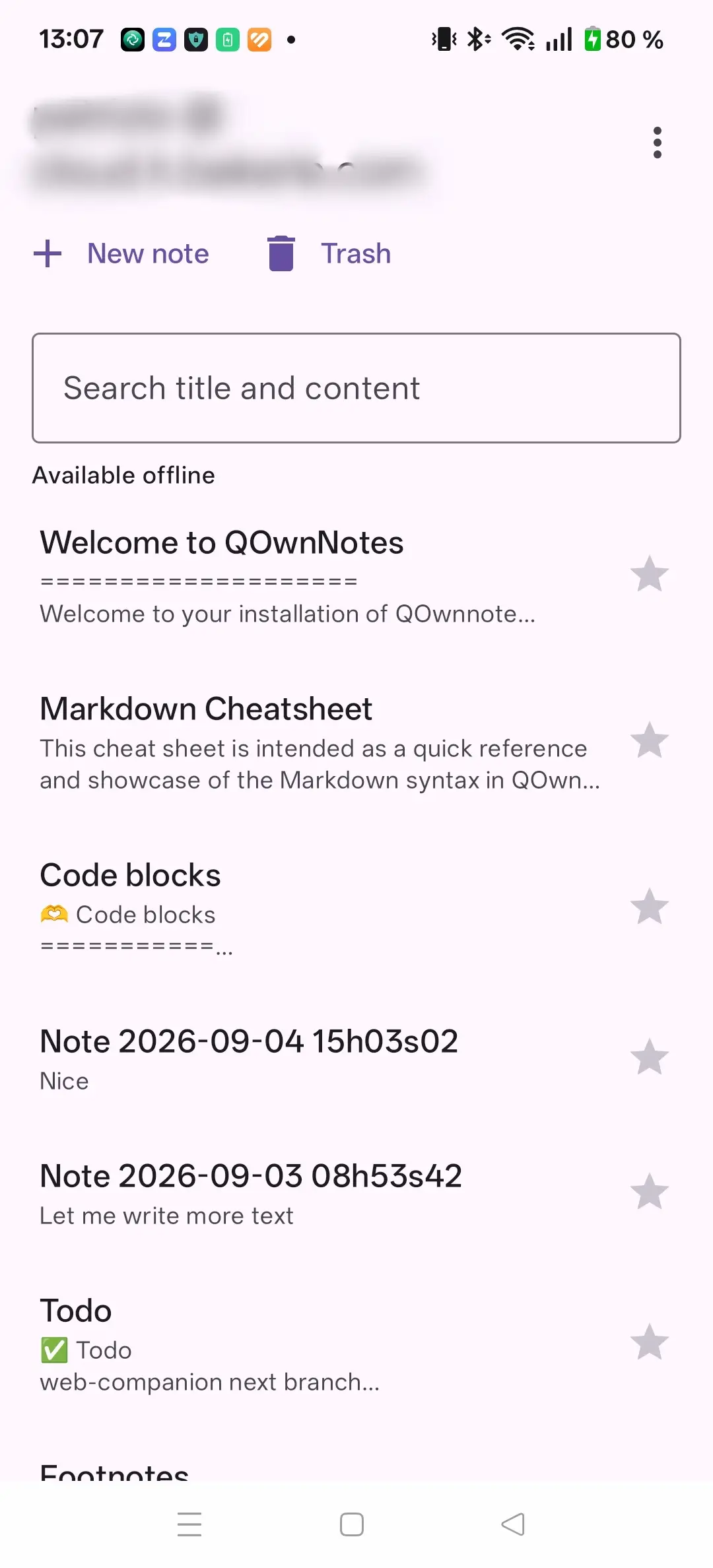
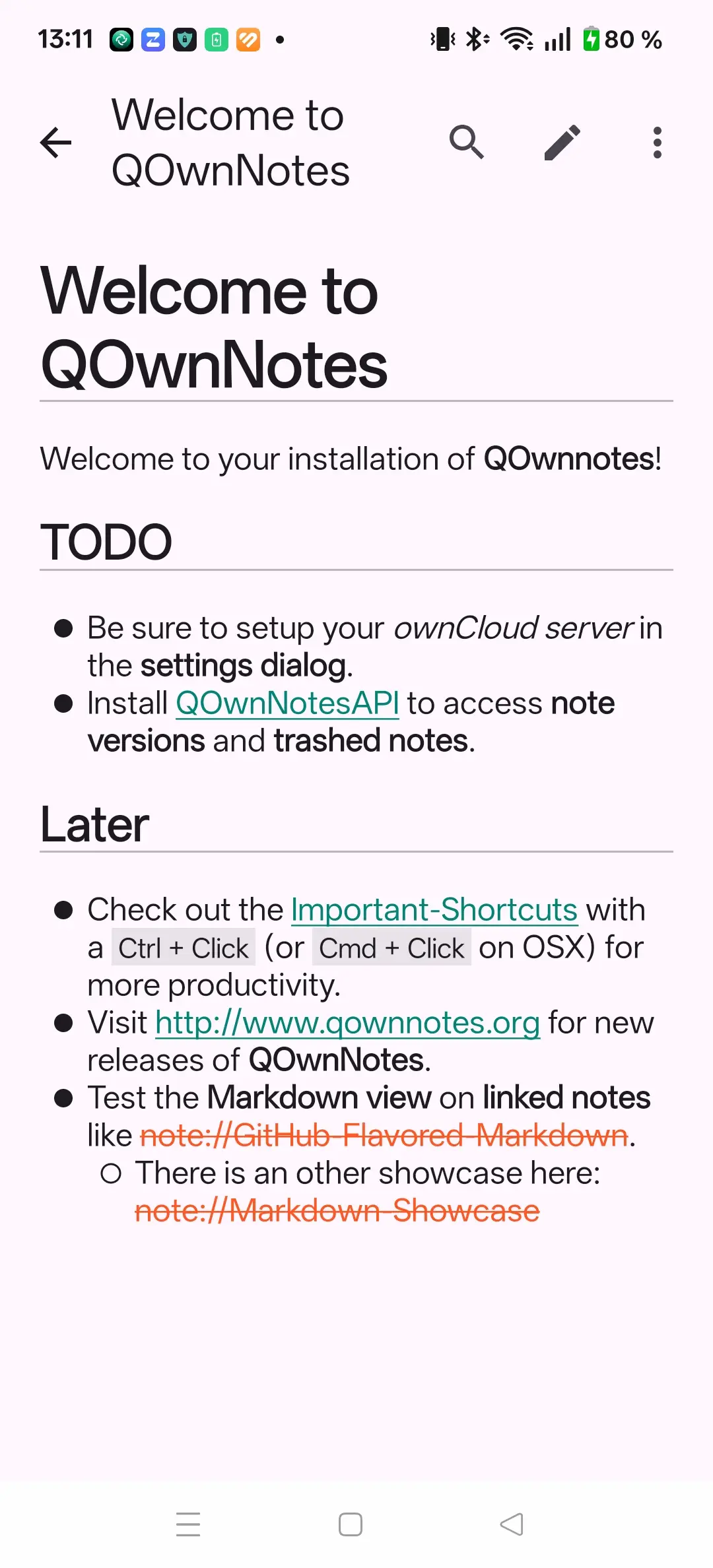
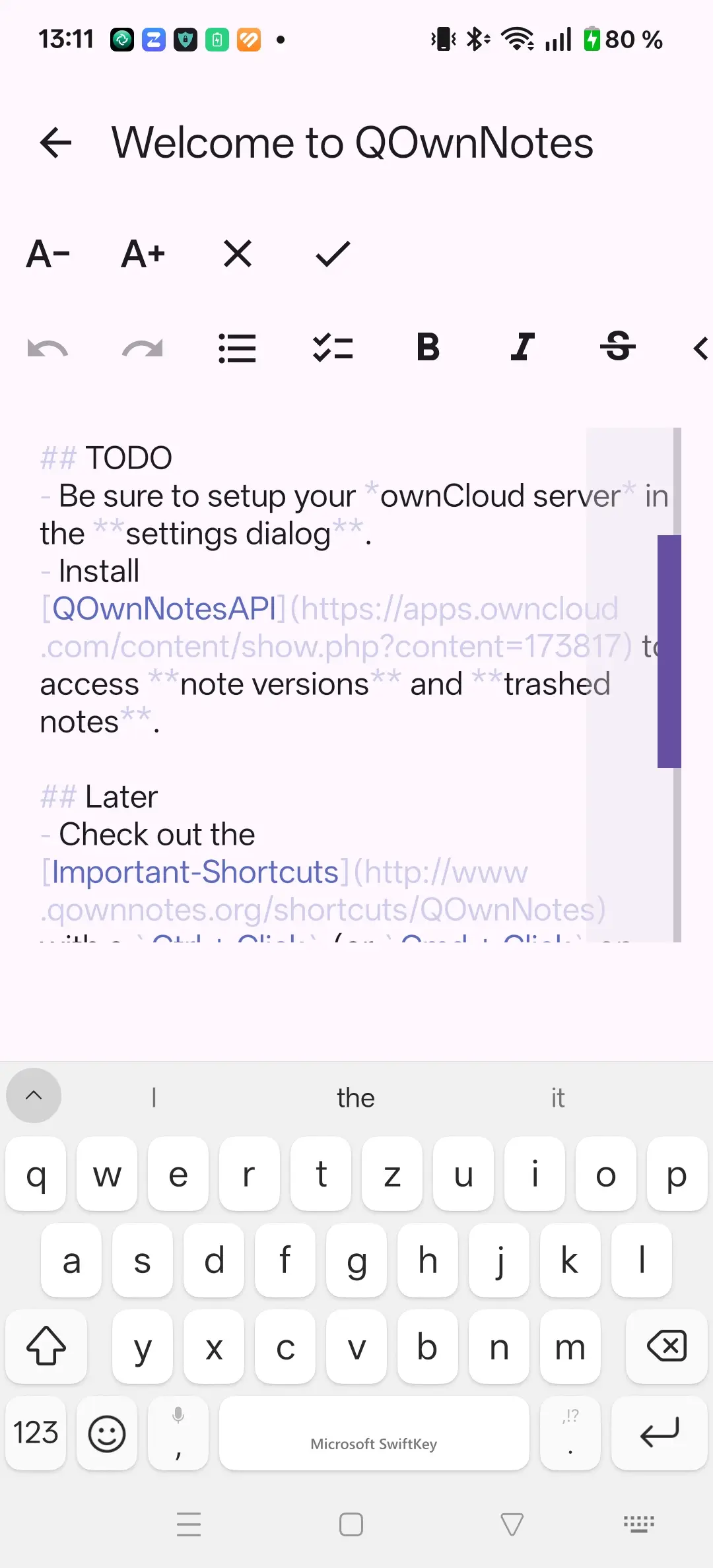
QOwnNotes Android note listQOwnNotes Android note viewQOwnNotes Android note edit

QOwnNotes for Android is an offline-capable Markdown notes app for Android that synchronizes with your Nextcloud server through the Nextcloud Notes API and the QOwnNotesAPI app.

It talks directly to Nextcloud Notes and QOwnNotesAPI on your Nextcloud server, giving you access to note synchronization, server-side note versions, and the trash bin from your phone.

Features

  • Offline-first: Room database as the local source of truth; edits are cached immediately and synchronized when the server is reachable
  • Nextcloud Notes API 1.2+ with incremental pulls, ETags, and conflict-safe updates
  • Single Sign-On import from the Nextcloud Files Android app
  • Note version history and remote trash browsing via the optional QOwnNotesAPI Nextcloud app
  • Favorites with offline toggling and favorites-first ordering
  • Markdown rendering for CommonMark, GitHub Flavored Markdown, checkbox lists with three states (open, done, partial), wiki links, tables, fenced code blocks, and remote images
  • Markdown editor with formatting actions, undo/redo, cursor preservation, and local draft persistence
  • Share-to-create notes from text shared by other Android apps
  • Light and dark themes on Android 9+

Installation

Visit the latest release page and download the APK.

Development builds are published alongside stable releases and can be installed side-by-side (different application ID).

Nextcloud account setup

  1. Install the Nextcloud Files Android app and sign in to your server.
  2. Open QOwnNotes for Android and choose Add Nextcloud account.
  3. The app requires the Nextcloud Notes server app with Notes API 1.2 or newer.
  4. If you also install the QOwnNotesAPI Nextcloud app, you gain access to note version history and the server-side trash bin.

Porady

Credentials stay in Nextcloud's SSO integration and are not copied into the QOwnNotes database.

Key differences from the Nextcloud Notes mobile app

FeatureQOwnNotes AndroidNextcloud Notes mobile
Offline editing with conflict detectionYesLimited
Note version history via QOwnNotesAPIYesNo
Remote trash browsing and restoreYesNo
Favorites with offline toggleYesNo
Three-state checkbox listsYesNo
Wiki-link and legacy note:// link supportYesNo

More information

  • GitHub repository
  • Changelog
Prev
QOwnNotes TUI
Next
QOwnNotes Web App